
Key Takeaways
- Scheduling is the part of this category that was solved years ago. What separates one product from another is whether the work gets closed and recorded by the person standing at the machine.
- The features worth paying for are the ones that decide completion. The ones worth discounting are the ones that look strongest on a comparison page.
- A system that can do everything and gets used for nothing is the most expensive item on your shortlist.
Every product in this category can build a schedule. Scheduling was solved a long time ago, and preventive maintenance software is still sold on it, with trigger types and calendar views and recurrence rules across the top of every comparison page. The difference between one of these systems and the next starts after the work order generates, in the ten minutes a technician spends in front of the machine. That is where a PM programme either becomes a record you can use or becomes a calendar you cannot.
What actually separates preventive maintenance software?
The distance between a technician standing at the asset and the job being recorded as done. Everything upstream of that moment is roughly level across the category. Everything downstream depends on it, because a schedule that generates work nobody closes leaves you with exactly what you have now.
A PM that generates and never gets completed still produces a tidy calendar. It produces no history. History is the thing you are actually buying. It is what tells you next year whether the interval was right, which machines are eating the hours, and what the crew found the last three times they opened that panel.
Underneath every product in this category is one design question. Does the workflow follow how the job is done, or how the software was built? Most of the friction a technician feels is the second one showing through. When product decisions are made by people who have never stood on a plant floor, the workflow follows software logic, and the person holding the wrench pays for it in clicks.
Time entry is the clearest case. A system that asks for minutes against each line of a checklist wants a number nobody on a plant floor has ever recorded accurately. Total time at the end of the job is the version that gets entered, because it is the version a person actually knows.
A maintenance director with thirty years on the floor put it plainly to us. Mechanics want to turn a wrench and have no love for the computer, and the thing that actually loses them is how long it takes rather than the screen itself. The same crew that walked away from one system will use the next one when raising a work order takes a click instead of a form with twelve fields.
Which preventive maintenance software features are worth paying for?
The ones that decide whether a scheduled job gets closed and recorded. Five are worth real money in a first system, and each protects something specific that you will otherwise lose by month three.
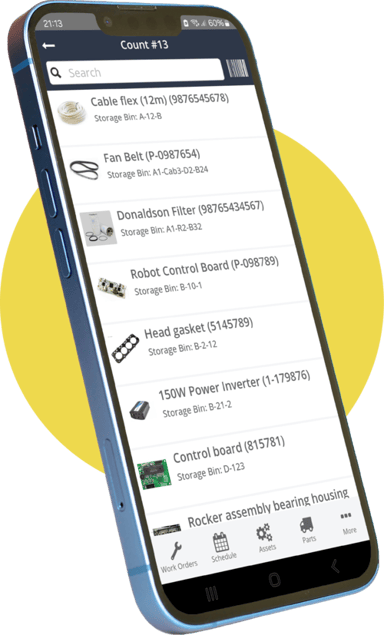
- The completion path on a phone. Count the actions between arriving at the asset and marking the job done. That count is the adoption rate of the system, and you can measure it before you buy.
- What happens when an inspection finds something. A check that only records pass or fail teaches you nothing about the machine. A failed task that raises a follow-on work order from inside the checklist is a finding that gets fixed. A failed task that raises nothing depends on somebody remembering it at the end of a shift.
- One asset, one screen. The frequency question gets answered from history and nowhere else. A logbook that pulls the key information from work orders onto the asset record makes that answerable without clicking through two years of jobs.
- Who can change a PM. If moving an interval needs a support ticket, the schedule drifts away from reality and stays there. Nobody raises a ticket to adjust a grease round.
- Who needs a paid seat. Technicians need accounts. The people who only report faults can go through a request portal without one. A team that rations logins ends up with one person retyping paper into the system, which is a saving that costs you the record.
What should you ignore when comparing preventive maintenance software?
Most of the comparison table. A feature list is a description of a product, and it carries no information about your team, so the biggest table on the page is the least useful thing on it.
Pendo's 2019 feature adoption report put the share of software features that are rarely or never used at roughly 80%. A much smaller group, about 12%, drives most of what people do inside a product. Your purchase turns on that small group, and no comparison page marks which features are in it.
The 2019 date is part of the point. Pendo's 2025 read on whole products rather than features found about 49% of the software a business buys goes unused. The proportion has held across six years, which makes it a condition to plan around rather than a bad year somebody caught.
Five things are safe to discount at this stage:
Every homepage in this category leads with capability. Ask customers what made them choose a system and stay on it, and the answer keeps coming back to how quickly they got going. That is the hardest thing to put on a homepage and the easiest thing to judge by using a product rather than reading about it.
Getting this wrong costs more than a wasted licence fee. A capability that demos well and fails at the machine is worse than never having had it, because the promise is spent. The team tries it once, it behaves differently from the way the screen implied, and everything you ask them to do in that system afterwards carries the memory of it.
That bill lands on you. You are the person who asked for this system, so an unused one costs the licence and the credibility you spent getting it approved. The next thing you ask the business for starts from further back than it would have.
Who is preventive maintenance software not for?
Teams whose real requirement sits outside maintenance execution. Three boundaries are worth naming plainly, because each one turns up late in an implementation when it turns up at all.
If the system has to write back into an ERP, this class of product is the wrong purchase. If it has to carry root cause analysis and FMEA at a reliability-engineering level, same answer. If it has to dispatch engineers out to customer sites and bill them, same again. Zoidii does not do those things, and it stays the wrong fit for those jobs however well it handles a PM. Hearing that here is more useful to you than discovering it in week three.
MaintainX is in most of these evaluations and is executing well, particularly on how fast a team picks it up. Quick pickup and a record that still holds a year later are separate achievements. The second one is what you are buying, so put both on the same scorecard. Expect any vendor worth buying from to tell you where somebody else is stronger.
For context on who is reading this, more than 90% of the teams who come to us arrive from paper, a notebook or a spreadsheet rather than from another CMMS. If that describes you, the comparison that decides your outcome is any of these products against the way the schedule runs today, which is a whiteboard and the memory of whoever has been here longest. Measured against that, the differences between the shortlist matter less than whether your crew opens whichever one you pick.
Preventive maintenance software earns its place in the ten minutes after a work order lands on somebody's phone. Everything before that is a calendar, and you already have one of those.
One question sorts the field quickly, and it costs nothing to ask. Ask what happens when a technician running a PM checklist finds a problem that is not on the list. Does that finding become a work order before the phone goes back in the pocket, or does it wait on somebody remembering it after the shift? The answer tells you what kind of record you will be holding a year from now. The schedule was never the hard part.
References
- Pendo, 2019 Feature Adoption Report: The 2019 Feature Adoption Report
- Pendo, 2025: Solving the software experience crisis
- Tricel, self-service mobile app adoption
- Arcadia Cold Storage, ease of training new hires